Sunday, July 23, 2017

Wiretapping AIX

Identified a couple of kernel and shared library functions, so I'm not poking in the dark anymore:

First of all I found execv. It gives a lot of insights about the AIX boot process. The process is quite different from Linux or Solaris boot. Kernel is small, and actually is already loaded, even under QEMU. The most other operating systems would write a greeting once a kernel is loaded. AIX does it all silently. On IBM machines there is a LED panel showing one byte of a status. On the Motorola there are just two LEDs which can light green or yellow, which altogether gives just 9 combinations. Not very informative. But even if I had one byte,  it still would not help. I look for error messages like "missing property", "unknown PCI chip", "missing residual data", etc.

The initialization of the PCI bus happens long after  the kernel spawns the /etc/init process.

Breakpoint 20, 0x0008cd38 in ?? ()
(gdb) x/s $r3
0x20051d08:     "/etc/methods/defsys"
(gdb) c
Continuing.
Breakpoint 20, 0x0008cd38 in ?? ()
(gdb) x/s $r3
0x2ff22090:     "/bin/sh"
(gdb) c
Continuing.
Breakpoint 20, 0x0008cd38 in ?? ()
(gdb) x/s $r3
0x20051d28:     "/usr/lib/methods/cfgsys_MOT3F00"       <= here is where it can't find the PCI bus

Then I found the printf and sprintf functions. Although AIX doesn't write anything on the screen, it still collects the boot log messages, so wiretapping  printf and fprintf helps to see them.

The house is still dark but now I have a search light. So whatever bugs are there, beware, you are going to be seen soon!

Saturday, July 22, 2017

Debugging AIX 4.2 boot

I wonder if it is possible to make the AIX 4.2 boot more verbose.
The various sources say that it should be done via
 
mw enter_dbg

under KDB. The AIX version I have doesn't have it. In fact it even doesn't have an option to disassemble a piece of code. Just the hardcore hex-dump, pretty much like it was in eighties.

That feeling when you started with a retro-computing and ended up with a steam punk computing.

ok  boot /scsi/disk@6 -s trap
Trap instruction interrupt.
> mw enter_dbg
032-001  You entered a command «mw» that is not valid.
> help
alter   … (a)lter — alter memory
back    … (b)ack — decrement the IAR
ditto   … «» — blank repeats the last command
break   … (br)eak — set a breakpoint
breaks  … (breaks) — list currently set breakpoints
buckets … (bu)ckets — display kmembucket structures
clear   … (c)lear — clear breakpoint(s)
display … (d)isplay — display a specified amount of memory
dmodsw  … (dm)odsw — display Streams dmodsw table
drivers … (dr)ivers — display device driver (devsw) table
find    … (f)ind — find a string in memory
float   … (fl)oat — display floating point registers
fmodsw  … (fm)odsw — display Streams fmodsw table
fs      … fs — display file system data structures
go      … (g)o — start executing the program
help    … (h)elp — display the list of valid commands
loop    … (l)oop — execute until control returns to this point
map     … (m)ap — display the system loadlist
mblk    … (mb)lk — display mblk/kmemstat structures
next    … (n)ext — increment the IAR
origin  … (o)rigin — set the origin
proc    … (p)roc — process table display
quit    … (q)uit — end the debugger session
queue   … (que)ue — display Streams queues
reset   … (r)eset — release a user defined variable
restore … (re)store — restore or do not restore the screen
screen  … (s)creen — display a screen containing registers and memory
set     … (se)t — define an/or set a variable
sregs   … (sr)egs — display segment registers
st      … (st) — store a full word into memory
stack   … (sta)ck — formatted stack trace
stc     … (stc) — store one byte into memory
step    … (ste)p — perform an instruction single-step
sth     … (sth) — store a half word into memory
stream  … (str)eam — display Stream head structures
swap    … (sw)ap — switch from the current display/keyboard to RS-232 port
thread  … (th)read — thread table display
trace   … (tr)ace — print traceback buffer
trb     … (trb) — display formatted timer request block info
tty     … (tt)y — Display tty struct
user    … (u)ser — formatted user area
uthread … (ut)hread — formatted uthread area
vars    … (v)ars — display a listing of the user_defined variables
vmm     … vmm — display virtual memory data structures
xlate   … (x)late — display the real address of a memory location
>

Sunday, July 16, 2017

Booting OFW from OFW

In order to use my new Motorola Powerstack II Utah machine as a reference for improving qemu there are two ways:

a) make qemu run the Powerstack II firmware
b) make Powerstack II run my firmware

I quickly tried running the Powerstack II firmware under qemu. After all that was the way which did let me run Solaris/SPARC under qemu 7 years ago. The firmware sort of starts, but gets into some very limited debugger. It looks to me that the debugger is from Motorola and it starts before launching the OFW. Last week I found out that the Powerstack II Utah firmware is no good for anything but one version of AIX, so this particular version is really not worth of launching.

So went for the option b) and made a firmware which can be netbooted on the Uhah.
It's even bootable on both Powerstack I and II, which was tricky. For some reason the different Powerstacks have slightly different ideas about the layout of the 0x41 partition. For instance, Solaris floppy image can not be netbooted. But there is one layout which works both for floppy any netbooting on both Powerstacks.

So now I netboot my OFW from the Motorola OFW, and then try booting AIX from the SCSI disk.
And then it hangs with the residual data. No wonder here - I used the device tree from qemu, so at least some devices are different or wired differently. But if I remove the creation of the residual data, it even boots AIX to the same point as the Motorola OFW.

The SCSI host on both Powerstacks is different than on the 40p machine.  The 40p (and qemu) have Vendor Id: 0x1000, Device ID 0x0001, which is according to the pcidatabase a LSI53C810 chip. The Powerstacks have Vendor Id: 0x1000, Device ID 0x0003, which is supposedly LSI53C1010-33. On the chip is written Symbios Logic 53C825A.

I may hit the difference beween the LSI (formerly known as Symbios and NCR) chips later, but at least 53C825A is reverse compatible to 810, otherwise my firmware would not be able to load anything.

Sunday, July 9, 2017

My new toys: Motorola PowerStack II

The second gift from Jochen is a Powerstack II mainboard with an AT power supply unit and a SCSI disk. The SCSI disk has "AIX" written on it, which looks promising, but Jochen doesn't remember if it was really installed, or just planned.

The board has Serial/Parallel/Ethernet/SCSI and even a couple of unsoldered IDE connectors.
The boot log shows it has a Firmworks based Open Firmware:

WARNING: NVRAM Header Test Failed - Auto Initializing
Starting real time clock...
screen not found.
Can't open input device.
Keyboard not present.  Using com1 for input and output.
, Serial #0, 64 MB memory
Power Firmware(TM) by FirmWorks , Built  Thu Jun 4 10:20:43 MST 1998
Copyright (c) 1995-1996 FirmWorks.  All Rights Reserved.
PowerPC Open Firmware
Version 1.2 RM11   Thu Jun 4 10:20:43 MST 1998
Copyright Motorola 1995-96, All Rights Reserved
Copyright FirmWorks 1995-96, All Rights Reserved

 CPU . . . . . . . . . . . . . . . . . . . . . . . . . . . =PowerPC,604e
 MicroProcessor Internal Clock Speed (MHZ) . . . . . . . . =300
 MicroProcessor External Clock Speed (MHZ) . . . . . . . . =67
 PCI Bus Clock Speed (MHZ) . . . . . . . . . . . . . . . . =33
 Local Memory Size . . . . . . . . . . . . . . . . . . . . =4000000 (64 MB)
 Memory Type . . . . . . . . . . . . . . . . . . . . . . . =EDO
 Memory Error Checking . . . . . . . . . . . . . . . . . . =ECC
 Memory Speed. . . . . . . . . . . . . . . . . . . . . . . =50 NS
 L2 Cache Size . . . . . . . . . . . . . . . . . . . . . . =256KB
 L2 Cache Type . . . . . . . . . . . . . . . . . . . . . . =Asynchronous
 L2 Cache Parity . . . . . . . . . . . . . . . . . . . . . =Disabled
 Configuration Checksum. . . . . . . . . . . . . . . . . . =Failed

Then it gets to a windowed menu interface (which doesn't look like the typical OFW at all), but under "Administrative options" it's possible to choose "Invoke the Command Line Prompt", which gives the famous "ok" prompt.

AIX starts booting from the SCSI disk:

Trying..., fdisk0 Recalibrate failed.  The floppy drive is either missing,
improperly connected, or defective.
Failed
Trying..., hdisk0 Booting
Please wait while the system is booting
Boot device: /pci/scsi@2/disk@6,0  File and args:
   

 ******* Please define the System Console. *******

 Type a 1 and press Enter to use this terminal as the
  system console.

cvga0
+ swcons -c

Saving Base Customize Data to boot disk
Starting the sync daemon
Starting the error daemon
System initialization completed.
Starting Multi-user Initialization
 Performing auto-varyon of Volume Groups
 Activating all paging spaces
swapon: Paging device /dev/hd6 activated.
 Performing all automatic mounts

And here it hangs. Probably it tries to perform a NFS mount, which I don't have.
Anyways it's much further than QEMU currently gets, so it's definitely can be used as a reference.

I don't have a UW-SCSI cdrom drive to boot from the Powerstack II  media. But it can be netbooted via tftp.

Surprisingly booting the Solaris/PPC did not work out. The floppy is not recognized, tried to netboot SOLARIS.ELF from the cd got an interesting error:

Rebooting with command: boot /pci/ethernet@4:172.22.0.20,SOLARIS.ELF,172.22.134.1
Boot device: /pci/ethernet@4:172.22.0.250,SOLARIS.ELF,172.22.134.51  File and args:
Trying to get Internet/Ethernet Address ...
       Contact your system administrator to see if
       a Boot Host and network is setup correctly.

so, obviously after switching to the Little-Endian mode the Motorola network driver doesn't work anymore. Looks like in 1998 netbooting Solaris and Windows NT was not relevant for Motorola anymore, otherwise it would have been tested.

Overall it looks like Motorola did heavily modify the OFW. For instance, there are no hidden words. Which is nice. It should be possible to peek if it has any quirks in creation of the residual data. Or better to say it could have been. It is all a one single quirk, there is no residual data.

Initially I thought that this would be a perfect firmware which would boot both PReP images and the later OFW-compatible ones. But alas. After poking around, I googled and found a couple of mails on the NetBSD mailing list stating that:
 1. The firmware doesn't provide any residual data
 2. The firmware doesn't have the PCI, DMA and interrupt mapping properties in the device tree.
Looking at the code I see that the first point is clearly caused by the second one. In the OFW the residual data is generated from the device tree. The code was not removed, but Motorola forgot to add the properties. 

Which makes it a worst possible firmware.

But still it can boot the AIX from the supplied SCSI disk. This explains at least one reason for a custom AIX: the Motorola version should be able to live without the residual data.

Probably the developers were in a rush, so instead of fixing the firmware properties, they just added a hack to the OS. Maybe the OS department had more resources than the firmware one, or maybe the developers who were able to do Forth, were on vacation or fired.

The result is ugly, but I think every software developer has done something similar at least once.

Anyway now I have a sort of reference machine which can sort of boot AIX.

P.S. And by the way, if you wonder why I keep writing  "Powerstack II Utah" instead of just "Powerstack II". It turned out multiple machines called "Powerstack II" were produced. And indeed they are incompatible. More gory details in the Linux kernel sources.

Sunday, July 2, 2017

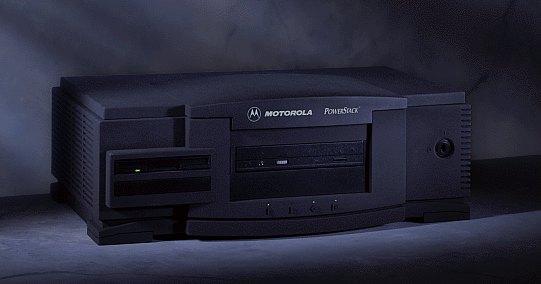
My new toys: Motorola Powerstack I

Jochen Kunz sent me two Motorola PowerStack toys. Thank you very much, Jochen. Now I should have the reference machines which I can use for fixing QEMU.

The first one is a classic PowerStack I machine, which looks pretty cool and has some kind of proprietary firmware (PPC1Bug).  To connect it via a serial line I had to use pretty much all the cables and adapters I have: short 9F-9F cable, 9M-25F adapter, 25F-25F cable, 25M-9F adapter.
On the desktop Linux side I use GNU screen on a serial line. Found this feature just a few days ago. For those who missed it too, that's how it gets attached to a running screen:

screen -X screen /dev/ttyS0  # note 2 screens, that's not typo

That's what it tells on powering on:

Copyright Motorola Inc. 1988 - 1995, All Rights Reserved

PPC1 Debugger/Diagnostics Release Version 1.8 - 10/04/95
COLD Start

Local Memory Found =02000000 (&33554432)

WARNING: Board Configuration Data Failure

MPU Clock Speed =100Mhz
WARNING: Keyboard not connected

Initializing System Memory (DRAM)...

System Memory: 32MB, Parity Enabled (Parity-Memory Detected)
L2Cache:       NONE, Parity NOT Enabled


SelfTest/Boots about to Begin... Press <BREAK> at anytime to Abort ALL

SelfTest about to Begin... Press <ESC> to Bypass, <SPC> to Continue

RAM      ADR: Addressability......................... Running ---> PASSED
PC16550  REGA: Register Access....................... Running ---> PASSED

PC16550  IRQ: Interrupt.............................. Running ---> PASSED
PC16550  BAUD: Baud Rate............................. Running ---> PASSED

PC16550  LPBK: Internal Loopback..................... Running ---> PASSED
Z8536    CNT: Counter................................ Running ---> PASSED

Z8536    LNK: Linked Counter......................... Running ---> PASSED
Z8536    IRQ: Interrupt.............................. Running ---> PASSED

Z8536    REG: Register............................... Running ---> PASSED
SCC      ACCESS: Device/Register Access.............. Running ---> PASSED

SCC      IRQ: Interrupt Request...................... Running ---> PASSED
PAR87303 REG: PC87303 Parallel Port's Register/Data.. Running ---> PASSED

DEC21040 REGA: PCI Register Access................... Running ---> PASSED
DEC21040 XREGA: Extended PCI Register Access......... Running ---> PASSED

DEC21040 SPACK: Single Packet Xmit/Recv.............. Running ---> PASSED
DEC21040 ILR: Interrupt Line Register Access......... Running ---> PASSED

DEC21040 ERREN: ERREN and SERREN Bit Toggle.......... Running ---> PASSED
DEC21040 IOR: I/O Resource Register Access........... Running ---> PASSED

DEC21040 CINIT: Chip Initialization.................. Running ---> PASSED
NCR      PCI: NCR 53c8xx PCI Access.................. Running ---> PASSED

NCR      ACC1: NCR 53c8xx Device Access.............. Running ---> PASSED
NCR      ACC2: NCR 53c8xx Register Access............ Running ---> PASSED

NCR      SFIFO: NCR 53c8xx SCSI FIFO................. Running ---> PASSED
NCR      DFIFO: NCR 53c8xx DMA FIFO.................. Running ---> PASSED

NCR      IRQ: NCR 53c8xx Interrupts.................. Running ---> PASSED
NCR      SCRIPTS: NCR 53c8xx SCRIPTs Processor....... Running ---> PASSED

I82378   REG: i82378 Register Access................. Running ---> PASSED
I82378   IRQ: Interrupt Request...................... Running ---> PASSED

AutoBoot about to Begin... Press <ESC> to Bypass, <SPC> to Continue

NetBoot about to Begin... Press <ESC> to Bypass, <SPC> to Continue

1) Continue System Start Up
2) Select Alternate Boot Device
3) Go to System Debugger
4) Initiate Service Call
5) Display System Test Errors
6) Dump Memory to Tape
Enter Menu #:

It doesn't have anything on its hard drive, so the only reasonable option here is 3):

PPC1-Diag>ioi
I/O Inquiry Status:
CLUN  DLUN  CNTRL-TYPE  DADDR  DTYPE  RM  Inquiry-Data
  0     0  NCR53C825   0      $00    N   SEAGATE  ST31230W         0456
  0    50  NCR53C825   5      $05    Y   TOSHIBA  CD-ROM XM-4101TA 1084
  1     0  PC8477      0      $00    Y   <None> 

Tried all boot disks I have.

+ Boots Solaris 2.5.1/PPC floppy, which provides some very limited Open Firmware (not even sure it's based on the Firmworks OFW). After booting the floppy it's possible to boot Solaris from a CD. Nice to have, but not my toy of the choice: it works in a little endian mode, which currently doesn't work under QEMU/PReP, and hardly has any software. But if one day all the other OSes emulated I may get back to it.

- Unsurprisingly doesn't boot from any IBM AIX CDs. Already heard that AIX is quite picky about the hardware, was just curious if it gives any error message. It doesn't.

- Surprisingly doesn't boot from the two Motorla AIX CDs I have:
    "AOS1_3__RM02" (aka AIX v4.1.4 for Motorola PowerStack II)
    "AOS1_4__RM03" (aka AIX v4.1.4r4 for Motorola PowerStack II)
So, obviously the PowerStack II AIX is not compatible with PowerStack I.

* Haven't tried booting Windows NT on it. There is a report in google groups that NT flashes another firmware which can only boot NT and it's not possible to get back to PPC1Bug. On top of that, NT is little-endian, just like Solaris 2.5.1/PPC, so all the considerations from the above apply here too.

The good news: it has  an i82378 PCI controller and a NCR53C825 SCSI, which is quite close to what QEMU/PReP/40p target currently emulates.
The bad news: unless I find a boot disk for AIX for Motorola PowerStack I, this machine can not be used for debugging AIX.

The next weekend I'll write about the second toy.

/Stay tuned

Sunday, March 5, 2017

Hercules Terminator 64 strikes back

This is how the S3-Trio64 story (the beginning is in the previous post) went on.

The monitor LED was blinking as if there was no signal, and it looked like after all my suspect was correct and a generic "vga-video-on" code was not enough to initialize a S3-Trio card.

I don't have a null-modem cable to debug OFW using a serial line, so all the instruments I had to debug what's going wrong were the "beep" and "reset-all" OFW commands. Which is not much. So I considered trying another emulators to verify my S3 OFW fix.

First I tried 86Box. Just like PCem it uses a ROM file name to determine whether a PCI card should be available for the emulation. So there is no official way to start it without VGA BIOS. But it's easy to hack: just rename a ne2000.rom to a desired VGA BIOS name. Then there is a network BIOS instead of VGA BIOS, which is harmless because it exits after not finding the network card. Yeah, 25 years ago I used my network card to read arbitrary ROMs, the story repeats itself in reverse.

The screen stayed black just like on a real PC, so I thought I've got an easy way to debug where it goes wrong. Although 86Box (just like PCem) don't emulate serial connections, still using a floppy image is much easier than writing a physical floppy. Alas, after some debugging it turned out PCem and 86Box don't emulate the PLL registers which was the reason why OFW didn't like it. Disabling the PLL restart took the OFW a couple steps further. Up to a 86Box crash, reported here.

Being desperate I even tried Microsoft Virtual PC, which supposedly emulates S3-Trio64. Well, it doesn't emulate the PLL, so I had to get back to the experiments with the physical card.

To make a long story short, the "vga-video-on" was not the problem. It seems that OFW supported only the most of S3 Trio64 and some of Trio64V+ chips.  I was just lucky to have an unsupported one. The OFW developers described the challenge of supporting the V+ chips in this nice comments:

   \ Problem: none of the above will have worked if this is a "Z" version
   \ of the Trio-64. "Z" versions are those parts marked with an "X" after
   \ their part number. Hey, I didn't make this up, S3 did. Anyhow, if you
   \ have one of these beasties, you have to wake up the part differently.
   \ The catch is, you pretty much have to do this in the blind because
   \ until the chip is working, you can't tell which version it is for if
   \ you go poking at a chip that is not awake yet, you may hang the system.

   \ As it turns out, the Trio-64V+ (which at this point in the probe process
   \ is indistinguishable from all of the other versions of the Trio-64, also
   \ won't have initialized prior to the above command. So, that extra command
   \ is usefull for both the "Z" Trio-64 and the Trio-64V+ (also known as the
   \ '765 [all other Trios have a '764 part number]). Oh but wait, there is
   \ more. The 765 does not respond to IO accesses unless the memory access
   \ enable bit is also turned on. Which is why the above now includes this
   \ "feature".
   \ And now back to our regularly scheduled programming...

So I tried to improve the Trio-64V+ recognition process, and Hercules Terminator 64 suddenly worked! The question is if the support of Trio-64V+ breaks the regular Trio-64.

I suspected my Trio-64V+ to be one of the last working ones in this Universe, but I wanted to be sure about it. After some googling I've stumbled over vogons.org, the community of people who still run S3 VGA (among some other cool stuff from the past) on a daily basis. So I asked them to test, and got a lot of responses. (Once again, thanks to everyone who responded)
Up to now there is no report of a Trio-64 which wouldn't work with the current OFW. So the fix is committed in the upstream OFW.

But still if you have one of  S3-Trio32, S3-Trio64 or S3-Trio64V+ cards, please test if they work with OFW, as described on vogons.org.

/Stay tuned for more S3-Trio adventures.

Saturday, March 4, 2017

AMD or NVIDIA? S3-Trio 64! (21+)

While on the Internet there are some hot discussions whether AMD or NVIDIA graphic adapters are better for virtualization, I think I'm the first one to pass thru a S3 Trio 64 VGA.

Well, I'm sure the regular readers of my blog are not just 21+, but probably rather 38+, and still under 90, so they can re what S3 Trio cards are. A casual reader may look it up on the Wikipedia. I can only say - it was very cool in 1995. And in 1997 I think all of my friends already got rid of the Trio VGAs (replaced with, you know, AGP and all this "modern" stuff).

Why S3 Trio? It was used in the IBM PReP machines. At least in IBM 7020 40p aka Sandalfoot. As you may know from my previous posts, Hervé is working on adding S3 Trio 64 emulation to QEMU, and it's still work in progress. I wanted to make sure it will work under OFW, so no proprietary IBM firmware would be necessary.

Boom! It turned out it has been broken in the OFW tree all the time since the sources were published - for more than a decade. No big deal - they are hardly existing (thought I). Made a trivial fix - use a generic "vga-video-on" instead of a chipset-specific one. It didn't work under qemu from the first attempt, because some S3-specific sequencer registers were not implemented, so I had to disable some extra checks. Then it worked. Meanwhile Hervé added the support of these registers, so it also works unmodified.

Probably it would have been a good idea to consider the project finished at this point. But I had already an experience where firmware and emulator were built based on the specs of each other and quite different with the real hardware (qemu-system-sparc and OpenBIOS till 2009, interrupt handling qemu-system-sparc64 till 2012 and so on). So I wanted an independent test, to make sure the generic "vga-video-on" good enough for the S3 cards.

Luckily I still had a Hercules Terminator 64 (S3-Trio64V+) VGA card lying in a basement. So I could check the firmware on the physical hardware. I don't have a PPC machine, but it's no big deal, because the OFW drivers are cross-platform. I've built a floppy with OFW for i686 (the OFW has all the necessary sources and documentation how to do it, thanks Mitch). Booted and got to the OFW "ok" prompt. It works, so the case solved, right? No! Since it's a "video-on", it might be that it worked only because it was initialized by VGA BIOS in the text mode. So I unterminated the Terminator:

Hercules Terminator 64, "unterminated"


The system beeped as if there were no VGA, but after me pressing F1 booted the floppy. The screen stayed black.

/ to be continued, stay tuned.

Sunday, February 12, 2017

AIX KDB under 40p

Some news on 40p emulation: it's possible to launch the AIX kernel debugger under qemu-system-ppc.  For some reason the current PowerPC 601 CPU frequency is limited to 7.81 Mhz in the upstream qemu, so it takes more than a hour to load the debugger. But with a small modification it gets to the point within seconds.

The command line:

$ qemu-system-ppc -M 40p -bios p12h0456.img -hda aix-5.1-cd1.iso -cpu 601

^^^ -cpu 601 is crucial. With the default CPU (604) it just hangs after a greeting.

 And after 90 minutes,  on the serial line....

AIX Version pinmore.c, s.@(#)65 1.1
Instruction Storage Interrupt - PROC
[kdb_get_virtual_memory] no real storage @ 646E6D60
KDB(0)> f
pvthread+000000 STACK:
WARNING: bad IAR: 646E6D60, display stack from LR: 646E6D5D
KDB(0)>
KDB(0)> dr
r0  : 00000000  r1  : 00595910  r2  : 00595C58  r3  : 00000001  r4  : 01C08180
r5  : 00000000  r6  : 00000000  r7  : 00000000  r8  : 00000000  r9  : 00000000
r10 : 00000000  r11 : 00000000  r12 : 646E6D61  r13 : 00606178  r14 : 000000B8
r15 : 00000020  r16 : 00000020  r17 : 0803004D  r18 : 005AF0BC  r19 : 003FED04
r20 : 00606178  r21 : 00000020  r22 : 00606000  r23 : 00003F50  r24 : 00003F48
r25 : 00003F3C  r26 : 00000000  r27 : 63683A2C  r28 : 00003A24  r29 : 00003A20
r30 : 00590C70  r31 : 00000000
KDB(0)>

It's a pretty neat debugger somewhat similar to Solaris kadb:

KDB(0)> dc main 40
.main+000000     mflr    r0
.main+000004      lwz    r3,36E8(toc)        36E8(toc)=NON_DEBUG_AIX
.main+000008     stmw    r30,FFFFFFF8(stkp)
.main+00000C      stw    r0,8(stkp)
.main+000010       li    r0,1
.main+000014      stw    r0,0(r3)            r0=00000001
.main+000018     stwu    stkp,FFFFFFC0(stkp)
.main+00001C       bl    <.kdb_init>
.main+000020       bl    <.hardinit>
.main+000024       bl    <.vmsi>
.main+000028       bl    <.hardinit_defered>
.main+00002C       bl    <.init_locks>
.main+000030       bl    <.init_anyother_locks>
.main+000034       bl    <.ios_init>
.main+000038       bl    <.kdb_pin_symtable>
.main+00003C       bl    <.debugger_init>
.main+000040       bl    <.kx2init>
.main+000044       bl    <.kmem_init>
.main+000048       li    r3,B
.main+00004C       bl    <.i_enable>         r3=0000000B
.main+000050       bl    <.k_protect>
.main+000054       bl    <.wlm_ccb_init>
.main+000058       bl    <.strtdisp>
.main+00005C       bl    <.epost>
.main+000060       li    r4,0
.main+000064      lwz    r3,13C4(toc)        13C4(toc)=kernel_lock
.main+000068       bl    <.lockl>
.main+00006C       li    r30,0
.main+000070      lwz    r3,37EC(toc)        37EC(toc)=init_tbl

/stay tuned

Saturday, February 4, 2017

PReP IBM 40p Emulation in qemu-system-ppc

Hervé Poussineau is doing a great job on improving PReP emulation in qemu. The initial patch series is getting merged into upstream master, but there is more in Hervé's git tree: http://repo.or.cz/qemu/hpoussin.git/shortlog/refs/heads/40p. I've built an OpenFirmware binary with SCSI support for it, and once Hervé improves S3 Trio emulation there will be a build with S3 support too.

Btw, the S3 Trio support in the Herve's branch is already pretty cool. Here are some screen shots of the boot process with the proprietary IBM firmware (it's really just the firmware, not an OS):

40p screen right after the reset

Other than IBM PC, an IBM PReP machine starts in a graphic mode with some animation, showing the initialization process.

Initializing devices

More devices...

All devices are found

Now the firmware tries to boot an OS or a System Management Services (SMS) disk:

F4 was pressed

Now there is a hidden but a well known feature. Instead of inserting a floppy, blindly type "eatabug", no quotes. For a tech person it may sound like "Enhanced ATA Bug", but I guess the pronunciation is "eat a bug". And this will open a resident monitor, which looks quite powerful (I still think OFW is more powerful though ;-).

Resident monitor help
 That's all about the 40p emulation for today.

/Stay tuned

Saturday, January 21, 2017

sun4v emulation is in qemu master

sun4v emulation patches were merged into QEMU master on January, the 19th. Directly from my git tree. So now I'm a real co-maintaier. ;-)

Saturday, November 5, 2016

sun4v emulation update

Just pushed v1. No new features, just clean ups. As a part of the cleaning up process, improved memory flushes, so the v1 should be a bit faster than v0. The new version available here:

https://github.com/artyom-tarasenko/qemu/tree/sun4v-v1

Another visible change is that the machine name is now spelt lowercase for the consistency with the other SPARC machines emulated by QEMU.

The new launch line:

sparc64-softmmu/qemu-system-sparc64 -M niagara -L /path/to/S10image/ -nographic -m 256 -drive if=pflash,readonly=on,file=/path/to/S10image/disk.s10hw2

Saturday, October 1, 2016

QEMU sun4v/Niagara target went public

I’m publishing my work on the sun4v emulation on the GitHub site:

https://github.com/artyom-tarasenko/qemu/tree/sun4v-v0

Yes, I hope it’ll make it into the upstream soon, but those who like to boot Solaris 10/SPARC under QEMU can do it straight away.

It uses the firmware (hypervisor, machine definition and OpenBOOT) from the OpenSPARC T1 project. So in order to use it, download

http://download.oracle.com/technetwork/systems/opensparc/OpenSPARCT1_Arch.1.5.tar.bz2

$ tar xfj OpenSPARCT1_Arch.1.5.tar.bz2 ./S10image
$ cd path/to/qemu-sun4v

$ sparc64-softmmu/qemu-system-sparc64 -M Niagara -L /path/to/S10image/ -nographic -m 256 -drive if=pflash,readonly=on,file=/path/to/S10image/disk.s10hw2

Sun Fire T2000, No Keyboard
Copyright 2005 Sun Microsystems, Inc.  All rights reserved.
OpenBoot 4.20.0, 256 MB memory available, Serial #1122867.
[mo23723 obp4.20.0 #0]
Ethernet address 0:80:3:de:ad:3, Host ID: 80112233.


ok boot –v
<…>
login: root

Enjoy!
In case you wonder why the path to drive image is not hard coded like all the paths to firmware components: it’s possible to specify a non-Solaris image, like HelenOS or NetBSD/sun4v (once it gets released).

Feel free to report me if you have more working OSes. :-)

 2016.11.04 Update: while the v0 version uses the name "Niagara", v1 and all subrequent ones will be using the lowercase name "niagara".

Saturday, August 6, 2016

Solaris 10 and year 2038 problem

Now I got a moment of a spare time to write why the Solaris 10 boot was failing under the new sun4v (sparc64) emulation target for QEMU.

It turned out that the now solved SMF issues I mentioned before were caused by a single character typo.

Stepping through the SQLite code I’ve noticed that there are two schemes: one persistent, which to my surprise has been opened with no problems, and a temporary one which failed because it could not create a file under /etc/svc/volatile which resides in RAM.

Why? Because of a very funny reason. The old Solaris versions used to check whether Real Time Clock (sometimes they call it “rtc”, sometimes they call it tod) returned a sane value and ignored it if it's not.

Solaris 10 issues a warning, but goes on and uses the given time. Then init system call creating file on a UFS considers time after 0x7fffffff invalid, which sends SMF into busy error loop.

The fatal typo was writing “qemu_clock_get_ns” instead of “qemu_clock_get_ms”, so I hit the error which the rest of the mankind using Solaris 10 for OpenSPARC T1 will hit 22 years later.

So let’s wait and see how many people will find my blog entries about SMF in February 2038.


Saturday, June 11, 2016

The second OS for the fresh sun4v emulation under QEMU

... is HelenOS. Although I was not able to boot the official 0.4 and 0.6.0 releases due to known problems with SILO (or OBP/Hypervisor), the current version works just fine:

HelenOS 0.6.0 revision 2521 under QEMU/sun4v
Note the nice reddish prompt. No other OS bootable under sun4v QEMU sparc64 emulation has something similar out of the box!

Saturday, April 16, 2016

FreeBSD-10.3/sparc64 under QEMU

I made a wrong statement on the debian-sparc mailing list, saying that the upstream qemu-system-sparc64 can already boot FreeBSD. As it turned out I spent too little time with the upstream QEMU. This made me feel obliged to fix it. This is how it's going to look in the QEMU 2.6.0, if my patches get accepted:

$ qemu-system-sparc64 -nographic -m 1024 -boot d -cdrom FreeBSD-10.3-RELEASE-sparc64-bootonly.iso
<...>
FreeBSD is a registered trademark of The FreeBSD Foundation.
FreeBSD 10.3-RELEASE #0 r297264: Fri Mar 25 06:26:08 UTC 2016
    root@releng1.nyi.freebsd.org:/usr/obj/sparc64.sparc64/usr/src/sys/GENERIC sparc64
gcc version 4.2.1 20070831 patched [FreeBSD]

Console type [vt100]: xterm


When finished, type 'exit' to return to the installer.
# uname -a
FreeBSD  10.3-RELEASE FreeBSD 10.3-RELEASE #0 r297264: Fri Mar 25 06:26:08 UTC 2016     root@releng1.nyi.freebsd.org:/usr/obj/sparc64.sparc64/usr/src/sys/GENERIC  sparc64
# ls
.cshrc          HARDWARE.HTM    bin             libexec         sbin
.profile        HARDWARE.TXT    boot            media           sys
.rr_moved       README.HTM      dev             mnt             tmp
COPYRIGHT       README.TXT      docbook.css     proc            usr
ERRATA.HTM      RELNOTES.HTM    etc             rescue          var
ERRATA.TXT      RELNOTES.TXT    lib             root
#
So, after all my statement should be correct. :-)
A pity the sun4v port of NetBSD is discontinued. So it's only for sun4u for now.

Tuesday, March 1, 2016

Hello, Solaris 10 under QEMU/sun4v!

SunOS Release 5.10 Version Generic_118822-23 64-bit
Copyright 1983-2005 Sun Microsystems, Inc.  All rights reserved.
Use is subject to license terms.
Ethernet address = 0:80:3:de:ad:3
mem = 1048576K (0x40000000)
avail mem = 1027579904
root nexus = Sun Fire T2000
pseudo0 at root
pseudo0 is /pseudo
scsi_vhci0 at root
scsi_vhci0 is /scsi_vhci
virtual-device: hsimd0
hsimd0 is /virtual-devices@100/disk@0

root on /virtual-devices@100/disk@0:a fstype ufs
pseudo-device: dld0
dld0 is /pseudo/dld@0
cpu0: UltraSPARC-T1 (cpuid 0 clock 5 MHz)
iscsi0 at root
iscsi0 is /iscsi

INIT: Executing svc.startd
svc.startd: Unknown SMF option "=debug".
Booting to milestone "milestone/single-user:default".
Hostname: unknown
Requesting System Maintenance Mode
SINGLE USER MODE

Root password for system maintenance (control-d to bypass):
single-user privilege assigned to /dev/console.

Entering System Maintenance Mode

Mar  1 14:09:35 su: 'su root' succeeded for root on /dev/console
Sun Microsystems Inc.   SunOS 5.10      Generic January 2005
#

Well actually the local time is 23:09:35, but I'm cool with it.

Sunday, February 28, 2016

What do SQL and SPARCv9 assembly language have in common?

Well, here we go: I’m debugging SQL execution switching between the kmdb kernel debugger and gdb.

Breakpoint 70, 0x000000000003e528 in sqliteInitOne ()
0x000000000003ec9c in sqlite_exec ()
(gdb) x $i1
0xadea8:        "SELECT type, name, rootpage, sql, 0 FROM \"main\".sqlite_master"

SMF uses sqlite, so the boot process involves some SQLs.
Who would think that 20 years ago?

But it’s fun indeed. Booting Solaris/sparc under sun4v not just involves plain repetition of the old exercises, but requires some totally new ones as well.

Saturday, February 27, 2016

Dial 1-555-MY-SMF

The boot process of the Solaris 2.5 – Solaris 9 is quite robust. If init for some reason fails, there is always a chance to add “-b” boot option and try to debug it manually.

I think the old generation of the Sun engineers implemented it just to make debugging on the real world hardware easier. I really appreciated this option 6 years ago as I was making Solaris/sparc under qemu possible.

Nowadays at the early stages they probably do the most of debugging in simulators.

This would explain why boot process debugging became much harder after introducing SMF in Solaris 10.

Particularly I’m hitting the following crash, happening multiple times pro second in an endless loop:

cpu0: UltraSPARC-T1 (cpuid 0 clock 5 MHz)
iscsi0 at root
iscsi0 is /iscsi

INIT: Executing svc.startd

svc.configd: smf(5) database integrity check of:

    /etc/svc/repository.db

  failed. The database might be damaged or a media error might have
  prevented it from being verified.  Additional information useful to
  your service provider is in:

    /etc/svc/volatile/db_errors

  The system will not be able to boot until you have restored a working
  database.  svc.startd(1M) will provide a sulogin(1M) prompt for recovery
  purposes.  The command:

    /lib/svc/bin/restore_repository

  can be run to restore a backup version of your repository.  See
  http://sun.com/msg/SMF-8000-MY for more information.

Requesting System Maintenance Mode
(See /lib/svc/share/README for more information.)
svc.configd exited with status 102 (database initialization failure)


On the other hand, now I can use the source of OpenSolaris and step through it in gdb. Different epoch different debug methods.

Saturday, February 20, 2016

Bad, bad cafe! (0xbaddcafe)

Debugging Solaris 10 boot I saw something interesting in an exception trace:

143368: Unaligned Memory Access (v=0034)
pc: 00000000f02421f8  npc: 00000000f02421fc
%g0-3: 0000000000000000 0000000000000001 0000000000000000 00000000edd00620
%g4-7: baddcafebaddcafe 0000000000002e7f 0000000000000000 00000000f0243de8 
%o0-3: 00000000018d46e0 0000000000000001 00000000ede8e7e1 0000000001213010

And indeed, this is not a random pattern. It's a helping hand from the great, wise Solaris engineers who cared to help the ancestors in finding problems with hardware and kernel modules:

opensolaris/usr/src/uts/common/sys/kmem_impl.h:
#define  KMEM_UNINITIALIZED_PATTERN      0xbaddcafebaddcafeULL

Looking at the OpenSolaris sources and Solaris documentation, there are more such helping patterns:

Uninitialized Data: 0xbaddcafe
Redzone: 0xfeedface
Freed Buffer Checking: 0xdeadbeef

They are described in the "Detecting Memory Corruption" chapter of Solaris Modular Debugger Guide, but did actually appear long before mdb.

Saturday, February 6, 2016

Yo dawg, I heard you like debugging


Here is the story: my sun4v can boot OBP, but booting Solaris 10 hangs with no error messages. Ok, being there, done that. Let’s start the Solaris kernel with a debugger. I really liked kadb for debugging early boot stuff, but the Solaris 10 image supplied with the OpenSPARC project has only its successor - kmdb.  Well, kmdb is indeed more advanced, but it’s also quite bigger than its predecessor.  Which might be (or might be not) the reason for it failing to boot:

Sun Fire T2000, No Keyboard
Copyright 2005 Sun Microsystems, Inc.  All rights reserved.
OpenBoot 4.20.0, 256 MB memory available, Serial #1122867.
[mo23723 obp4.20.0 #0]
Ethernet address 0:80:3:de:ad:3, Host ID: 80112233.
ok boot -kdv
Boot device: /virtual-devices/disk@0  File and args: -kdv
Loading ufs-file-system package 1.4 04 Aug 1995 13:02:54.
FCode UFS Reader 1.12 00/07/17 15:48:16.
Loading: /platform/SUNW,Sun-Fire-T2000/ufsboot
Loading: /platform/sun4v/ufsboot
The boot filesystem is logging.
The ufs log is empty and will not be used.
Size: 0x76e40+0x1c872+0x3123a Bytes
module /platform/sun4v/kernel/sparcv9/unix: text at [0x1000000, 0x1076e3f] data at 0x1800000
module misc/sparcv9/krtld: text at [0x1076e40, 0x108f737] data at 0x184dab0
module /platform/sun4v/kernel/sparcv9/genunix: text at [0x108f738, 0x11dd437] data at 0x18531c0
module /platform/sun4v/kernel/misc/sparcv9/platmod: text at [0x11dd438, 0x11dd43f] data at 0x18a4be0
module /platform/sun4v/kernel/cpu/sparcv9/SUNW,UltraSPARC-T1: text at [0x11dd440, 0x11e06ff] data at 0x18a5300
Loading kmdb...
module /platform/sun4v/kernel/misc/sparcv9/kmdbmod: text at [0x11e0700, 0x124b2bf] data at 0x18b4da0
module /kernel/misc/sparcv9/ctf: text at [0x124b2c0, 0x1252d97] data at 0x18d6ed0
module /kernel/misc/sparcv9/zmod: text at [0x1252d98, 0x1257a67] data at 0x18d7af8
failed to decompress CTF data for unix: File data structure corruption detected
failed to decompress CTF data for genunix: String name offset is corrupt
failed to decompress CTF data for ctf: File data structure corruption detected
failed to decompress CTF data for zmod: File data structure corruption detected


What is the solution? Connect another debugger (gdb) to QEMU and debug the Solaris debugger (kmdb). Sounds reasonable, right?  In the next step I found a place where memory is already corrupted. This has been easy: as you see, the Solaris engineers put some sanity checks in the CTF code. Well done, Sun guys!
Finding the place where it gets corrupted is a bit harder: gdb has no watch-points on the physical memory, supporting only virtual memory watch-points. The solution is indeed starting the QEMU process itself in a debugger. At this point it gets slightly insane:

I put a debugger (kmdb) in a debugger (gdb x86-64) and connected it to a debugger (gdb sparc-v9) so I can debug while I’m debugging a debugger.

Saturday, January 30, 2016

sun4v in QEMU


Back in 2012 I played with sun4v emulation in QEMU, using it mostly instead of pain killers to get some distraction from a broken leg. The project was considered to be a toy, since I hadn’t expected to get it far enough to be useful for anything. I got it up to the OBP ok prompt, so it’s been sort of already useful at least for playing with post-sun4u OpenBoot and Forth.

Now I’m considering tidying up the code and submitting it upstream.  Tell you what.  Cleaning up the old code is pain. The usual problem with the quick and dirty code that you write once intending to throw it away immediately is that for whatever reasons this code is not thrown away in the 99% of cases. Instead it finds its way into production systems where it lives years and years.

So, a note to myself and the two other guys reading this blog: use a version control system (preferably git :-) ) for any project lasting more than 8 hours. Do it regardless whether you think you never going to need it.  I used to think a week is a good threshold, but even one week is way too much (and if you worked that week something like 16 hours a day, sorting out the mess you created would require some weeks).

Anyway, I’m back to my sun4v experiments.  How many weekends it’ll take to get it into a good shape? Let’s see.

Stay tuned.

Saturday, October 10, 2015

Oracle strikes back!

The Oracle Enterprise Linux for sun4v has just been released!

Based on RHEL 6 and kernel 4.1.  https://oss.oracle.com/projects/linux-sparc/

How cool is that?!?

Saturday, June 27, 2015

The number of Debian/SPARC64 users doubled overnight

That's right, I've upgraded my virtual wheezy image to Debian/sparc64 Sid. So I'm the second user who has installed and run Debian popularity contest:


Don't know who is the first user, and don't know why the submission on ~ 29.04.2014 on the graph above hasn't doubled the number of users back then.

Update: Debian/SPARC64 is mostly working, but there are some caveats:
Link time optimization with "gold" linker produces broken binaries. Unfortunately this hits systemd and udev, so those have to be re-built manually. I've submitted a bug for the upstream binutils.

In the mean time if anyone needs a working systemd-udevd, you can ask me. There is also a report that the qt build is broken, but I don't use it - only need a working console.