Showing posts with label NCR53c8xx. Show all posts

Saturday, September 9, 2017

From SCSI to PCI

20 years ago SCSI devices ruled the world. Reading the NCR53c810 manual, I see that it was basically a computer in a computer. It can be programmed to transfer data from/to/between the disks without using the CPU at all.

Trying to understand what happens in the NCR/LSI script:

lsi_scsi: Select LUN 0
lsi_scsi: Extended message 0x1 (len 3)
lsi_scsi: SDTR (ignored)
lsi_scsi: SCRIPTS dsp=81c3b924 opcode 80080000 arg 81c3b9a4
lsi_scsi: Jump to 0x81c3b9a4
lsi_scsi: SCRIPTS dsp=81c3b9a4 opcode 870b0000 arg 81c3b9c4
lsi_scsi: Compare phase 2 == 7
lsi_scsi: Control condition failed
lsi_scsi: SCRIPTS dsp=81c3b9ac opcode 860a0000 arg 81c3b94c
lsi_scsi: Compare phase 2 == 6
lsi_scsi: Control condition failed
lsi_scsi: SCRIPTS dsp=81c3b9b4 opcode 98080000 arg 00000022
lsi_scsi: Interrupt 0x00000022
...
lsi_scsi: SCRIPTS dsp=81c3bb6c opcode 0e000002 arg 81c3bdb4
lsi_scsi: MSG out len=2
lsi_scsi: Select LUN 0
lsi_scsi: MSG: ABORT tag=0x0
lsi_scsi: SCRIPTS dsp=81c3bb74 opcode 80080000 arg 81c3bbbc
lsi_scsi: Jump to 0x81c3bbbc
lsi_scsi: SCRIPTS dsp=81c3bbbc opcode 60000008 arg 00000000
lsi_scsi: Clear ATN

Looks like it aborts if the selected SCSI target doesn't change phase to MSG_OUT or MSG_IN. So I implemented a hack for SDTR reply and it doesn't abort here. But indeed it's a red herring. AIX can also work with the devices which do not support the synchronous or wide transfers.

The actual problem happens later:

lsi_scsi: SCRIPTS dsp=81c43444 opcode c0000004 arg 010000dc
lsi_scsi: memcpy dest 0x81c435fc src 0x010000dc count 4

Or, with a bit more enhanced logging:

lsi_scsi: memcpy dest 0x81c475fc (Mem) src 0x010000dc (IO) count 4
lsi_mem_read, address_space_read status 2
lsi_scsi: the first 4 bytes: 00 00 00 00

It tries to read the port 0x10000dc and save it. QEMU doesn't have anything at the port 0x10000dc, so no wonder the NCR script fails. But what is supposed to be there? The Motorola Ultra 603/Ultra 603e/Ultra 604 Programmer’s Reference Guide suggests it must be the PCI I/O space.

So looks like I've learned enough of NCR/LSI script. Time to see how the PCI bus mastering is supposed to work on this machine.

Saturday, September 2, 2017

More fun with AIX cfgncr_scsi

<in the previous part>... doesn't find SCSI disks. Here it is tricky, it may be a problem with the interrupt routing, or DMA or SCSI host emulation...

... or a bug in the AIX driver itself.

As AIX 4.2 tries to perform scsi inquiry, that's what happens in the QEMU log:

(qemu) lsi_scsi: Write reg ??? ac = e4
lsi_scsi: Write reg ??? ad = 38
lsi_scsi: Write reg ??? ae = c4
lsi_scsi: Write reg ??? af = 81

The register at 0xac-0xaf is DSA Relative Selector (DRS). Is known to qemu, but seems to be not used in any operations.

The newer LSI53c1010-66 manual says:

"This register supplies AD[63:32] during Table Indirect
Fetches and Load/Store Data Structure Address (DSA)
relative operations"

So, maybe just add the support of this register to QEMU and allow the 64 bit DMA transfers, right?

Wrong. The write to this register is the last write and it doesn't start any SCSI command. Let's look where it happens:

p8xx_start_chip:
...
   0x018ff854:  stw     r8,-4(r7)
   0x018ff858:  li      r4,44         ; 0x2c
   0x018ff85c:  b       0x18fe348     ; p8xx_write_reg <= write happens here

The register r4 is 0x2c, but the procedure writes to 0xac. Weird.

Let's look at the other registers:

0x018fe368 in ?? ()
(gdb) info registers r3 r5 r4
r3             0x18f5000        26169344
r5             0x31000080       822083712
r4             0x2c     44

What's that 80 at the end of r5? 0x80 + 0x2c is 0xac. Coincidence? Don't think so.

So, what happens here is the driver tries to write 0x2c, but the bus is shifted, so it hits 0xac. After some chasing I found where this shift is coming from:

p8xx_config:
...
   0x018fdb9c:  bl      0x1909938
   0x018fdba0:  lwz     r2,20(r1)
   0x018fdba4:  cmpwi   cr1,r3,19
   0x018fdba8:  beq     cr1,0x18fdbc8
   0x018fdbac:  li      r8,1
   0x018fdbb0:  stb     r8,256(r28)
   0x018fdbb4:  li      r3,0
   0x018fdbb8:  bl      0x1909938
   0x018fdbbc:  lwz     r2,20(r1)
   0x018fdbc0:  lwz     r8,160(r28)
   0x018fdbc4:  b       0x18fdbd0
   0x018fdbc8:  stb     r29,256(r28)
   0x018fdbcc:  lwz     r8,160(r28)
   0x018fdbd0:  lis     r11,4096
   0x018fdbd4:  addic   r10,r8,128    ; this is the 0x80 I'm looking for
   0x018fdbd8:  li      r8,-1
   0x018fdbdc:  rlwinm  r31,r26,1,15,30
   0x018fdbe0:  addic   r23,r28,10580
   0x018fdbe4:  stw     r10,252(r28)
   0x018fdbe8:  li      r25,1
   0x018fdbec:  addi    r30,r28,0
   0x018fdbf0:  stwu    r25,10512(r30)
   0x018fdbf4:  stw     r8,10588(r28)
   0x018fdbf8:  lwz     r8,10500(r28)
   0x018fdbfc:  stw     r11,10520(r28)
   0x018fdc00:  stw     r10,10532(r28) ; and here it is stored
...

It is added and stored unconditionally. If I drop this addic, something different happens:

(qemu) lsi_scsi: Write reg DSP0 2c = e4
lsi_scsi: Write reg DSP1 2d = 58
lsi_scsi: Write reg DSP2 2e = c4
lsi_scsi: Write reg DSP3 2f = 81
lsi_scsi: SCRIPTS dsp=81c458e4 opcode 41000000 arg 81c45a44
lsi_scsi: Selected target 0
lsi_scsi: SCRIPTS dsp=81c458ec opcode 78370000 arg 00000000
lsi_scsi: Read-Modify-Write reg 0x37 MOV data8=0x00 sfbr=0x00
...

Why would it work on the physical hardware? I guess because the addresses are aliased. Pretty similar to the le bug in Solaris.

So, it's not that QEMU has some unimplemented registers. In this case it has too many implemented ones.

On the other hand, it still doesn't detect the scsi disk, so maybe it has not just too much features, but too few as well...

/Stay tuned

Sunday, July 2, 2017

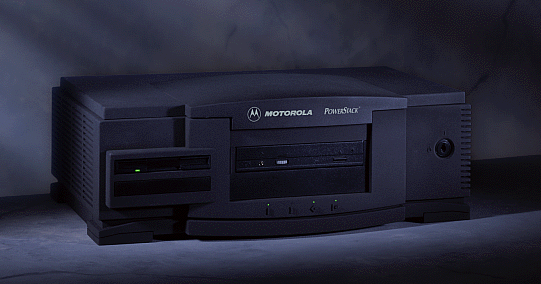
My new toys: Motorola Powerstack I

Jochen Kunz sent me two Motorola PowerStack toys. Thank you very much, Jochen. Now I should have the reference machines which I can use for fixing QEMU.

The first one is a classic PowerStack I machine, which looks pretty cool and has some kind of proprietary firmware (PPC1Bug).  To connect it via a serial line I had to use pretty much all the cables and adapters I have: short 9F-9F cable, 9M-25F adapter, 25F-25F cable, 25M-9F adapter.
On the desktop Linux side I use GNU screen on a serial line. Found this feature just a few days ago. For those who missed it too, that's how it gets attached to a running screen:

screen -X screen /dev/ttyS0  # note 2 screens, that's not typo

That's what it tells on powering on:

Copyright Motorola Inc. 1988 - 1995, All Rights Reserved

PPC1 Debugger/Diagnostics Release Version 1.8 - 10/04/95
COLD Start

Local Memory Found =02000000 (&33554432)

WARNING: Board Configuration Data Failure

MPU Clock Speed =100Mhz
WARNING: Keyboard not connected

Initializing System Memory (DRAM)...

System Memory: 32MB, Parity Enabled (Parity-Memory Detected)
L2Cache:       NONE, Parity NOT Enabled


SelfTest/Boots about to Begin... Press <BREAK> at anytime to Abort ALL

SelfTest about to Begin... Press <ESC> to Bypass, <SPC> to Continue

RAM      ADR: Addressability......................... Running ---> PASSED
PC16550  REGA: Register Access....................... Running ---> PASSED

PC16550  IRQ: Interrupt.............................. Running ---> PASSED
PC16550  BAUD: Baud Rate............................. Running ---> PASSED

PC16550  LPBK: Internal Loopback..................... Running ---> PASSED
Z8536    CNT: Counter................................ Running ---> PASSED

Z8536    LNK: Linked Counter......................... Running ---> PASSED
Z8536    IRQ: Interrupt.............................. Running ---> PASSED

Z8536    REG: Register............................... Running ---> PASSED
SCC      ACCESS: Device/Register Access.............. Running ---> PASSED

SCC      IRQ: Interrupt Request...................... Running ---> PASSED
PAR87303 REG: PC87303 Parallel Port's Register/Data.. Running ---> PASSED

DEC21040 REGA: PCI Register Access................... Running ---> PASSED
DEC21040 XREGA: Extended PCI Register Access......... Running ---> PASSED

DEC21040 SPACK: Single Packet Xmit/Recv.............. Running ---> PASSED
DEC21040 ILR: Interrupt Line Register Access......... Running ---> PASSED

DEC21040 ERREN: ERREN and SERREN Bit Toggle.......... Running ---> PASSED
DEC21040 IOR: I/O Resource Register Access........... Running ---> PASSED

DEC21040 CINIT: Chip Initialization.................. Running ---> PASSED
NCR      PCI: NCR 53c8xx PCI Access.................. Running ---> PASSED

NCR      ACC1: NCR 53c8xx Device Access.............. Running ---> PASSED
NCR      ACC2: NCR 53c8xx Register Access............ Running ---> PASSED

NCR      SFIFO: NCR 53c8xx SCSI FIFO................. Running ---> PASSED
NCR      DFIFO: NCR 53c8xx DMA FIFO.................. Running ---> PASSED

NCR      IRQ: NCR 53c8xx Interrupts.................. Running ---> PASSED
NCR      SCRIPTS: NCR 53c8xx SCRIPTs Processor....... Running ---> PASSED

I82378   REG: i82378 Register Access................. Running ---> PASSED
I82378   IRQ: Interrupt Request...................... Running ---> PASSED

AutoBoot about to Begin... Press <ESC> to Bypass, <SPC> to Continue

NetBoot about to Begin... Press <ESC> to Bypass, <SPC> to Continue

1) Continue System Start Up
2) Select Alternate Boot Device
3) Go to System Debugger
4) Initiate Service Call
5) Display System Test Errors
6) Dump Memory to Tape
Enter Menu #:

It doesn't have anything on its hard drive, so the only reasonable option here is 3):

PPC1-Diag>ioi
I/O Inquiry Status:
CLUN  DLUN  CNTRL-TYPE  DADDR  DTYPE  RM  Inquiry-Data
  0     0  NCR53C825   0      $00    N   SEAGATE  ST31230W         0456
  0    50  NCR53C825   5      $05    Y   TOSHIBA  CD-ROM XM-4101TA 1084
  1     0  PC8477      0      $00    Y   <None> 

Tried all boot disks I have.

+ Boots Solaris 2.5.1/PPC floppy, which provides some very limited Open Firmware (not even sure it's based on the Firmworks OFW). After booting the floppy it's possible to boot Solaris from a CD. Nice to have, but not my toy of the choice: it works in a little endian mode, which currently doesn't work under QEMU/PReP, and hardly has any software. But if one day all the other OSes emulated I may get back to it.

- Unsurprisingly doesn't boot from any IBM AIX CDs. Already heard that AIX is quite picky about the hardware, was just curious if it gives any error message. It doesn't.

- Surprisingly doesn't boot from the two Motorla AIX CDs I have:
    "AOS1_3__RM02" (aka AIX v4.1.4 for Motorola PowerStack II)
    "AOS1_4__RM03" (aka AIX v4.1.4r4 for Motorola PowerStack II)
So, obviously the PowerStack II AIX is not compatible with PowerStack I.

* Haven't tried booting Windows NT on it. There is a report in google groups that NT flashes another firmware which can only boot NT and it's not possible to get back to PPC1Bug. On top of that, NT is little-endian, just like Solaris 2.5.1/PPC, so all the considerations from the above apply here too.

The good news: it has  an i82378 PCI controller and a NCR53C825 SCSI, which is quite close to what QEMU/PReP/40p target currently emulates.
The bad news: unless I find a boot disk for AIX for Motorola PowerStack I, this machine can not be used for debugging AIX.

The next weekend I'll write about the second toy.

/Stay tuned